Your Questions, Answered
We’ve assembled the most frequently asked questions about Eversense into one place. Got a question that you can’t find the answer to? Contact us.
To view the glucose reports tap Menu > Reports and swipe to move across the three different reports. You can also email each report as a pdf file by tapping the email icon in the top right hand corner.
Types of reports:
- Glucose Pie Chart
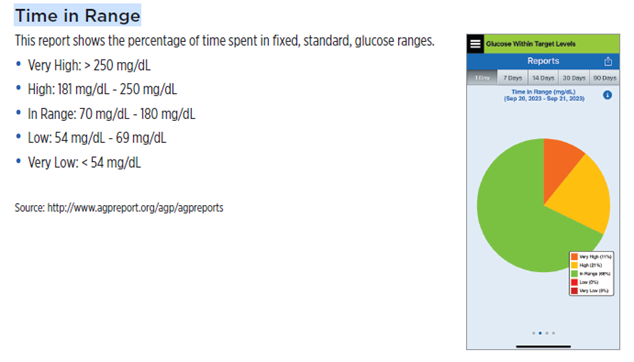
- Time in Range
- Weekly Modal Summary
- Glucose Statistics
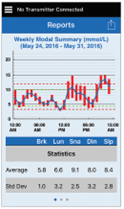
The Weekly Modal Summary report shows your last seven days of glucose readings summarized in a 24-hour line graph format to help find patterns during the day.
- The blue line is the average of the last seven days of your readings in an hour time block.
- The red bars show the highest and lowest actual readings in the same hour time block.
- The red horizontal dotted lines are your pre-set High and Low Glucose Alert levels.
- The green horizontal dotted lines are your pre-set High and Low Glucose Target levels.
This report also provides summary statistics (average readings, standard deviation of readings), glucose target performance (percent within, above and below glucose target levels), and glucose reading highs and lows (percent of readings that fall within the low and high glucose target levels).
The information is shown based on mealtime slots.
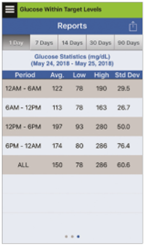
The Glucose Statistics report shows your average, low and high glucose readings, along with standard deviation within 6 hour time periods. You can choose the last 1, 7, 14, 30 or 90 days.
The Eversense® App does not have a Bolus Calculator.
The Eversense® CGM is compatible with Glooko and Apple Health. Syncing data to Glooko is initiated via the user’s Glooko account. They will need to know their Eversense® username and password to link their Eversense® account via Glooko.
Still have questions?
The Eversense team is dedicated and ready to provide the answers and support you need. Simply click the link below.
The Eversense® 365 Continuous Glucose Monitoring (CGM) System is indicated for continually measuring glucose levels for up to one year in people (18 years and older) with diabetes. The system is indicated for use to replace fingerstick blood glucose (BG) measurements for diabetes treatment decisions. Fingerstick BG measurements are required for calibration one time a week after day 13, and when symptoms do not match CGM information or when taking medications of the tetracycline class. The sensor insertion and removal procedures are performed by a health care provider. The Eversense 365 CGM System is a prescription device; patients should talk to their health care provider to learn more.
For important safety information, see bit.ly/eversensesafety
Eversense, Eversense 365 Continuous Glucose Monitoring, and the Eversense logo are trademarks of Senseonics, Incorporated. All other trademarks are properties of their respective owners and are used solely for informative purposes. No relationship or endorsement should be inferred or implied.
Apple Watch® is a product of Apple, Inc., and may be separately purchased from an authorized Apple retailer. Apple Watch is not included with the Eversense CGM System. Android is a trademark of Google LLC.
MKT-001692 Rev 1


 Call My Eversense Specialist Now
 Schedule a Call